Release 2026.1
Some exciting things packing in this release! Some highlights:
- UI/UX updates to Initiative and to Notes
- Fixes to copy paste and similar systems
- A new ‘custom data’ concept has been added to shapes, allowing amongst other things a simple character sheet
Variant functionality will be simplified in 2026.2, see Variants for more info.
This release was originally slated for November/December, but the technical reworks (see later) ended up needing a longer period to iron out stability.
This release also contains contributions from a variety of people, thanks to all of you, as well as to all the people who reported bugs on the development branch!
Initiative
These changes have been contributed by Rexy712
As mentioned in the intro, the UI has gotten some updates as can be seen below.
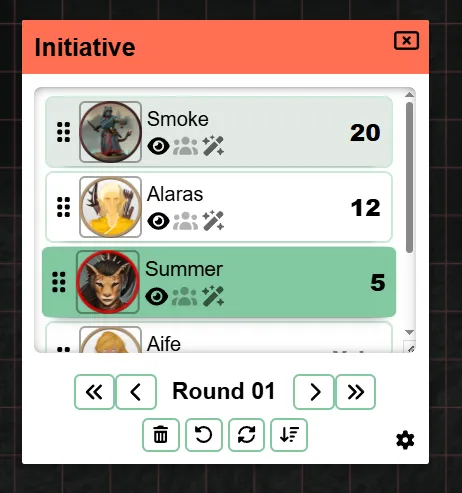
It now also has an internal overflow scroll, so that the initiative element itself does not become gigantic if there are a lot of actors in the initiative.
Another new addition is that when adding effects, you can now also make an effect infinite in time, previously you always had to fill in a number of turns until it would disappear.
As a DM there is now also the option to just clear the entire initiative in one go, as well as buttons to advance initiative by a full round.
Character Sheet Basics
Why
One of the complaints I tend to get from time to time revolves around the lack of character sheets. I’ve always believed that having a generic character sheet that would fit all systems/uses is not really feasible and as a result that character sheets are beter suited for mods.
That said, mods are still very experimental, require technical knowledge to create and let’s be honest PA is a very niche VTT. It’s no surprise that as a result there has not really been any work in this space.
I still believe that a decent looking ‘one fits all’ character sheet is not really feasible, but I ventured forth to create a more rudimentary system, that integrates with the dice system. This way, mods can still behind the scenes use this common core system, while offering a more visually pleasing UI.
How
This release adds a new tab to the “edit shape” UI, called “custom data”.
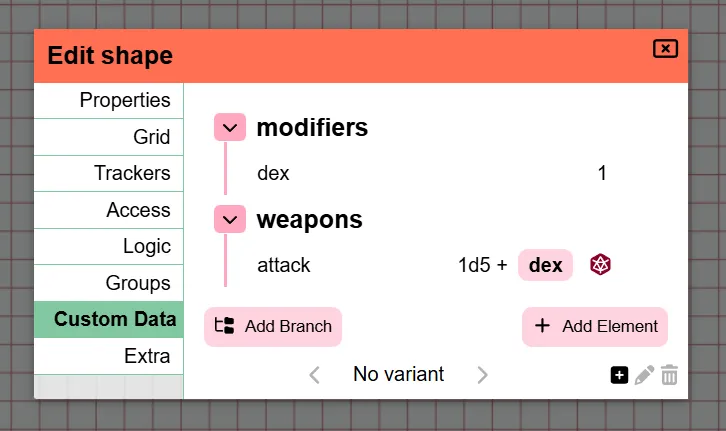
In here you can freely add data related to the shape. You can organize the data in a tree style data format.
The data you can add can be any of 3 types currently:
- text
- number
- dice expression
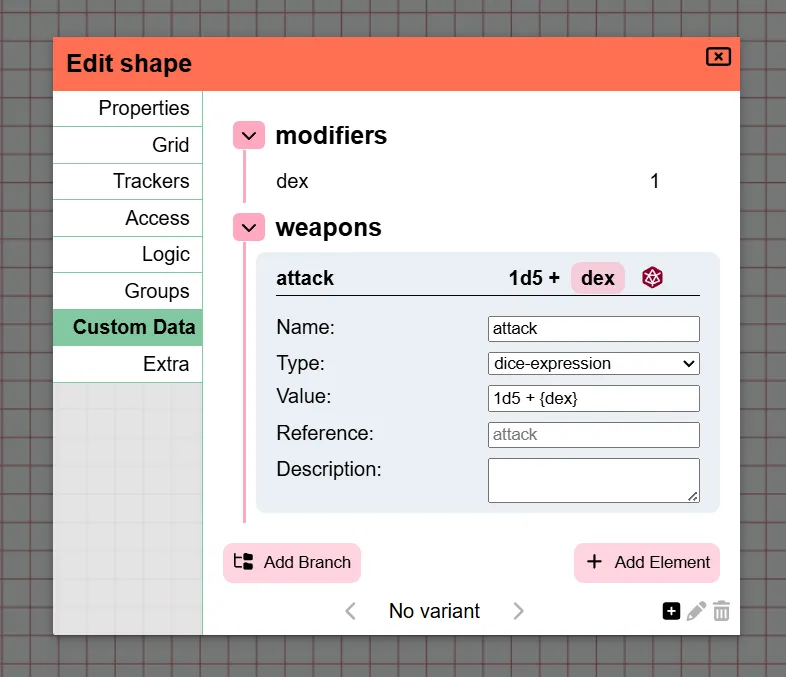
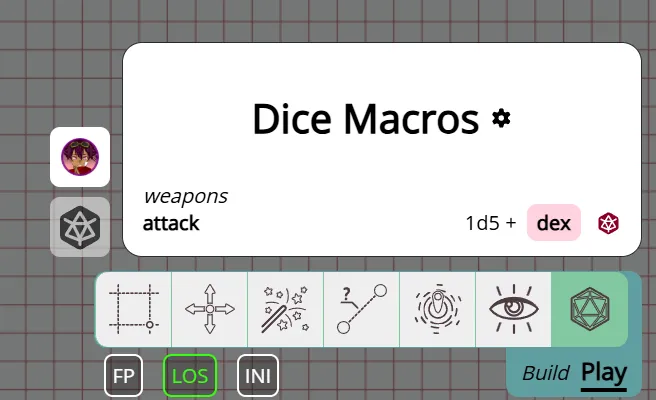
Most of these are pretty self-explanatory. The nice thing about dice expressions is that you can immediately load up the dice tool with the given expression, which can reference other custom data elements, called references for short.

Additionally you can also use these references directly in the dice tool, which will show an auto complete UI to help select the stat from the correct shape.
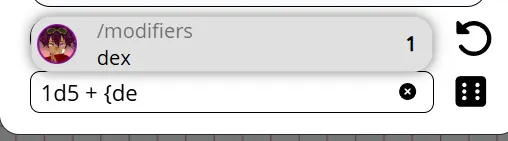
Another addition to the dice tool is that a quick button is present for each shape in your selection, that has dice expressions. This makes it so that you don’t constantly have to open the shape settings, navigate to the custom data tab and click on the roll button for the desired roll.
Future
The goal is to update some other places to interact with the references as well. Trackers and auras being one of the most prominent places that could benefit from this interaction. (e.g. a HP tracker related to a HP reference)
Another things that I would love to do is make an actual system specific character sheet mod as a decent showcase. There is however for me a big problem of licensing/rights in this regard.
For a lot of systems it’s not allowed, or contracts need to be in place, to offer these things in an official capacity. D&D for example is something I’m very hesitant to touch in this regard, even though there is the SRD, they haven’t really been welcoming of other players given that they have their own tools. Similarly I contacted the Mothership people to see what’s possible, but I received a message that currently no vtt integrations are allowed. The wildsea system is very open and I actually started work on a wildsea related mod over in the example mods repository, but my one big problem there is that that system is actually one of the rare systems that I don’t use a VTT myself at all, so it feels a bit silly.
So I’m not really sure what I’m going to do here moving forward as it’s a damned if I do damned if I don’t kind of setup, where legally I can’t really do a lot, but people seem to want integrations.
Notes
In release 2024.1 a big rework of the note system was introduced. It added a unified framework and better UI around some loose concepts that existed before.
It introduced the concept that either the note is a global note, available in all your campaigns, or it’s specific to a campaign location. The idea being that you usually have notes specifc to your game (local) or notes that you often need like stat blocks (global). You are able to swap between local/global or both and you can also do some filtering like “only show notes for the current location”.
Now 2 years later it’s a good time to re-evaluate how I feel about the system and change things that don’t feel right.
Problems with the current system
Campaign notes
One of the issues I tend to run into is that I make a lot of notes that are only relevant to a particular location. This means that when I’m on location X, I either see all the notes for every location in my game, or I only see the ones for my current location.
This on paper sounds fine, in practice however I also have some notes that are relevant for the entire campaign and that campaign only. The problem is that because every note is inherently associated with the location it was created in, these campaign-wide notes are difficult to find. If you filter your notes to the current location, you no longer see the campaign-wide notes (unless they happened to be created in your current location), if you don’t do the filter you see a million notes and it’s difficult to keep track of anything.
The filter for active location is also hidden behind an extra menu, making it quite cumbersome to toggle between this frequently.
Shape notes
Another oddity is that because a note is associated with the location it was created in, we get in awkward setups when the note is attached to a shape and that shape moves location. This made the note not always appear in correct places.
Global notes
As mentioned earlier, global notes fill a niche for some notes that you might need frequently. In my original vision this would mostly be for monster stat blocks or system rulesets. I’ve since had some people mention that they sometimes have notes that are relevant to a selection of campaigns because the same (n)pcs might feature in them.
The problem however is that for global notes the access setup requires more work, because they don’t belong to a particular campaign, PA doesn’t know which players to suggest. So you have to manually link every player to every such note, which can become cumbersome quite quickly.
Location notes
A last annoyance is that because you only have the choice between “all locations” or “current location”, any note from another location that you just want to consult quickly requires either fully changing the location or searching through all the notes. The latter can or cannot be feasible depending on whether you remember the title.
What is changing
So with those pain points in mind, this release revamps some of the concepts.
Dropping Global/Local
The local-global just didn’t end up working out as I expected initially. The reality is that notes vary greatly in their use and can be relevant to 1 location, multiple locations over multiple campaigns or not really a specific campaign at all.
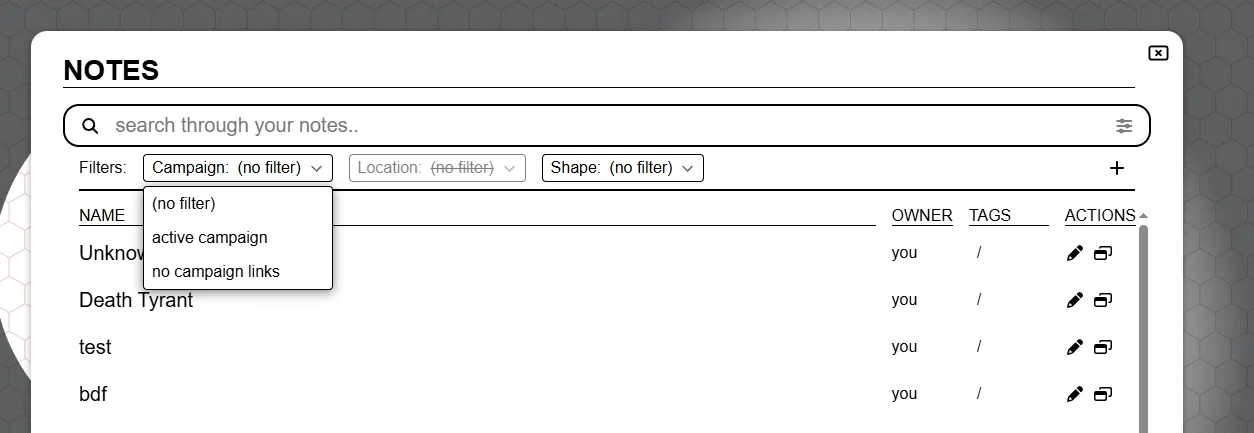
As a result it’s now more focused around linking a specific campaign and/or location to a note. When creating a note initially you now select whether it’s main goal is campaign-wide, location specific or shouldn’t have a link in particular, but you can still link whatever other location you want.
Filter UI
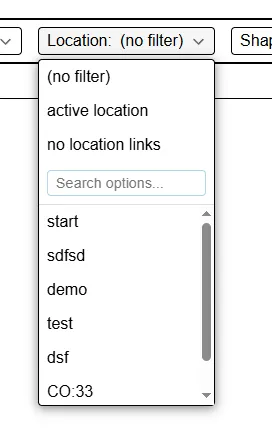
Instead of the confusing preferences panel + the tag filter bar, the search/filter UI has been reworked to an active filter bar that is always immediately accessible and allows you to show notes from locations you’re not currently active on.
Server side pagination
Something not specifically mentioned in the pain points is that until now notes were paginated fully client-side. What this means is that all notes had to be provided to the client when you load a campaign. This was easy to have a quick working version out initially, but it just adds more load to both startup time and the database, while in reality you’re usually not interacting with the majority of the notes.
Now notes are only fetched from the server when actually requested.
The pagination UI has also moved to the bottom left and been made more visually clear.
Tags
It was possible to freeform add tags to any note. There was however no real QoL to help you with managing tags. You pretty much had to know how exactly you typed a particular tag in the past when adding it to a new note as there is no dropdown/completion/search or whatsoever.
This release changes it so that tags are properly managed in a separate database collection instead of being random json data attached to a note. This allows the UI to actually show existing tags in your note edit details and also be present in the filter UI bar.
.
Variants
Permission fixes
contributed by Rexy712
The way access/permissions for variant shapes was set up was preventing non DMs from changing some aspects of them. The following fixes have been done:
- Players may now add variants to shapes they have edit access to
- Players may now swap between variants of shapes they have edit access to
- [tech] Variants’ access permissions are now based on the permissions of the parent shape only
Announcement of rework
Variants are currently implemented in a quite complicated manner. For each variant there is a real shape instance and there is a hidden controller shape that is responsible for showing the correct shape and managing the state/interactions of all variants.
The positive aspect of this is that each variant can be completely tuned to whatever it wants to be. All shape settings are unique to that variant, allowing full creative freedom.
It however comes with a lot of downsides.
- Any concept that is supposed to be shared between the variants has to be duplicated. Any change you do that might apply to all the variants, needs to be done to all the variants.
- The exception being trackers/auras for which a special system was added to make them shareable.
- The entire codebase has to do extra logic just for this niche concept, as the way the shapes are managed affects a lot of interactions
- This adds extra overhead to every other feature to try and work nicely with potential variant shapes
- Because they work so irregular to the vast majority of shapes, they frequently end up with subtle issues
The reality is that the full creative freedom for every shape is just not worth all the hassle and in reality also just not needed in the vast majority of cases. At its core the idea of variants is just to be able to quickly swap between some art assets with potentially some small differences.
The small differences I can envision to be actually handy are the size of the token, potentially a different name and some trackers/auras.
I intend to reduce the entire complexity of multiple shapes and swapping between them, to just 1 shape. This 1 shape will have a new tab to manage variants, where you can add a new entry with an icon and a name.
And that’s it. For trackers and auras this also means that the special “shared” concept can be removed. My initial plans are to offer no special interactions for trackers/auras and to just have the user toggle the trackers/auras as necessary when changing variants. If this ends up being too much of a hassle, I’m open to look into adding some tracker/aura specific toggle logic to the new variant tab.
This does also mean that the UX will be improved in general, as it’s currently not possible to actually load a particular variant directly if you have multiple configured. You currently need to cycle through them, which reveals them momentarily to all players that can see the shape.
This will be changed in 2026.2. If you have worries/problems with this change, contact me so that we can see what’s possible.
Grid snapping fixes
contributed by Rexy712 and Craftidore
A variety of fixes to snapping behaviour have been made.
Keyboard interactions
Keyboard movement now also snaps to the closest grid cell (when snapping is relevant). Until now this was not being done, causing some funky cases where you’re moving a shape off-grid because it touched a wall once along the way.
Additionally a bug was fixed that caused keyboard movement to move a shape twice if the ruler was enabled in the select tool during the move.
Horizontal vs Vertical size
In 2024.2 more control over a shape’s size in the grid’s context was added. Allowing the user to say how big the shape should act on the grid when moving it around regardless of the actual art size. It would also show you the inferred size PA thinks the shape is otherwise.
This release adds further improvements to this by splitting up this size property in a horizontal and vertical component (for square grids). This fixes some snapping behaviour when a shape is irregular (e.g. 2x7).
Technical reworks
Data duplication improvements
PA underwent multiple technical refactors that fixed a number of long openstanding issues, that I could not fix until these changes were made.
In particular two things were modified:
- How intermediate shape data is represented in the client
- How (shape) templates are stored in the database
I’ll spare you the technical details, but the result is that the following actions all had a variety in bugs in common that should now work correctly
- undo/redo shape deletion
- copy-paste a shape
- dropping a template on the board
These 3 systems all have existed and worked (to some degree). They however all were not able to deal with shape information that is stored in more specialized places. Notes for example are stored in a separate database collection, causing the undo/redo to forget about a note relationship with a shape and copy-paste to have no clue either.
Instead of having to add special cases all over the place, the new restructure works in such a way that the above 3 systems don’t actually have to know about the details, it just works.
Asset templates
Storage changes
Asset templates are a nice system that allows the user to save data related to a certain asset so that if you drop the asset on the board in the future it is pre-populated. (e.g. remembering the HP/AC for a goblin)
Among the problems mentioned in the earlier section, templates also had some other issues. By the way they were stored in the database, they were not affected by any migration of the database to a new version.
This means that templates made in earlier versions could potentially not behave correctly when used in a new version.
They will now be stored as regular shapes in the database, allowing auto-migration as well as making some other internal logic more consistent.
Asset manager icon
This is not a technical rework, but it is asset template related.
The asset manager now shows an icon on those assets that have template data. This helps if you have multiple assets with the same name (due to different collections or the like) and you’re not sure which one you have saved info on.
Pydantic upgrade
This is a purely technical upgrade to a data validation library the server uses. It however has a significant impact on the data flow and although there should be no actual noticeable change for players, it’s always possible that I missed some cases causing errors in the server.
I’m mentioning it here mostly for server hosts, so that if they see any validation errors popping up in their server logs, that they report these issues asap!
Bugfixes
Shape order inconsistency
To ensure shapes are shown visually in the correct order when overlapping, the server keeps track of a position per shape. When moving a shape around, some shapes need their position adjusted as they may have moved up or down.
Although this has been working pretty well for a long time, there is no real error correction today, so if for some reason somewhere something bugs and causes a gap in the order or a duplicate position entry, it could cause some funky behaviour.
It would be quite expensive to constantly check the integrity of the order, so instead I ventured out to find a place where the inconsistency can be checked easily and that is not run frequently.
From now on if you do the “move shape to back” action, a check will be done to see if the amount of updated shapes matches with the expected amount. If this is not the case, all shapes will be re-positioned and a notification will appear to all connected clients that explains the issue and asks for a refresh to ensure visual correctness.
Additionally the position update query has been improved from a performance standpoint, though you’re likely not going to notice this.
Server changes
Logging
contributed by nwhansen
Logging behaviour can now be configured using the server config.
This allows the server owner to choose whether or not file logs are kept and which severity the various loggers capture.
See the config docs for more details.
With this change the default logging is stdout only, so no file logging as it was before this release.
Additionally the “max_log_backups” and “max_log_size_in_bytes” log settings that were originally in the “general” section of the config are now moved to the file logging section. If you had these specifically configured, your server will no longer start!
Varia
- off-screen token direction images overflowed their container
- ignore keybinds in select element
- ampersand in campaign name breaking game
- rotated polygon fixes
- cutting
- moving points
- Campaign creator can no longer change their own role or kick themselves
- Account settings text overlapping on smaller viewport widths
- Moving special hide/reveal shapes from the fow layer could lead to a niche bug
- Rotation slider not showing current value in text input on component load
- DDraft files no longer being uploadable to the asset manager
- Hovering on an initiative entry that is part of a group but not marked as a group entry would highlight all group members
- Error log about viewports on the server
- Toggling initiative off vision lock interactions
- Initiative cog wheel not opening initiative tab in the client settings
- Initiative entries would remain blurred if the focused entry was removed by another player.
- Group system not properly cleaning up on location changes
- Group badges were not sorted numerically in a shape’s group settings when set to the numbers character set.
- Tracker input resets to last value if left empty